Head-to-head / core competitor

SlayZone vs Superset.sh

Same desktop-agent DNA. Different product thesis. SlayZone optimizes for task-first orchestration; Superset optimizes for workspace-first agent execution.

Last checked 2026-03-27
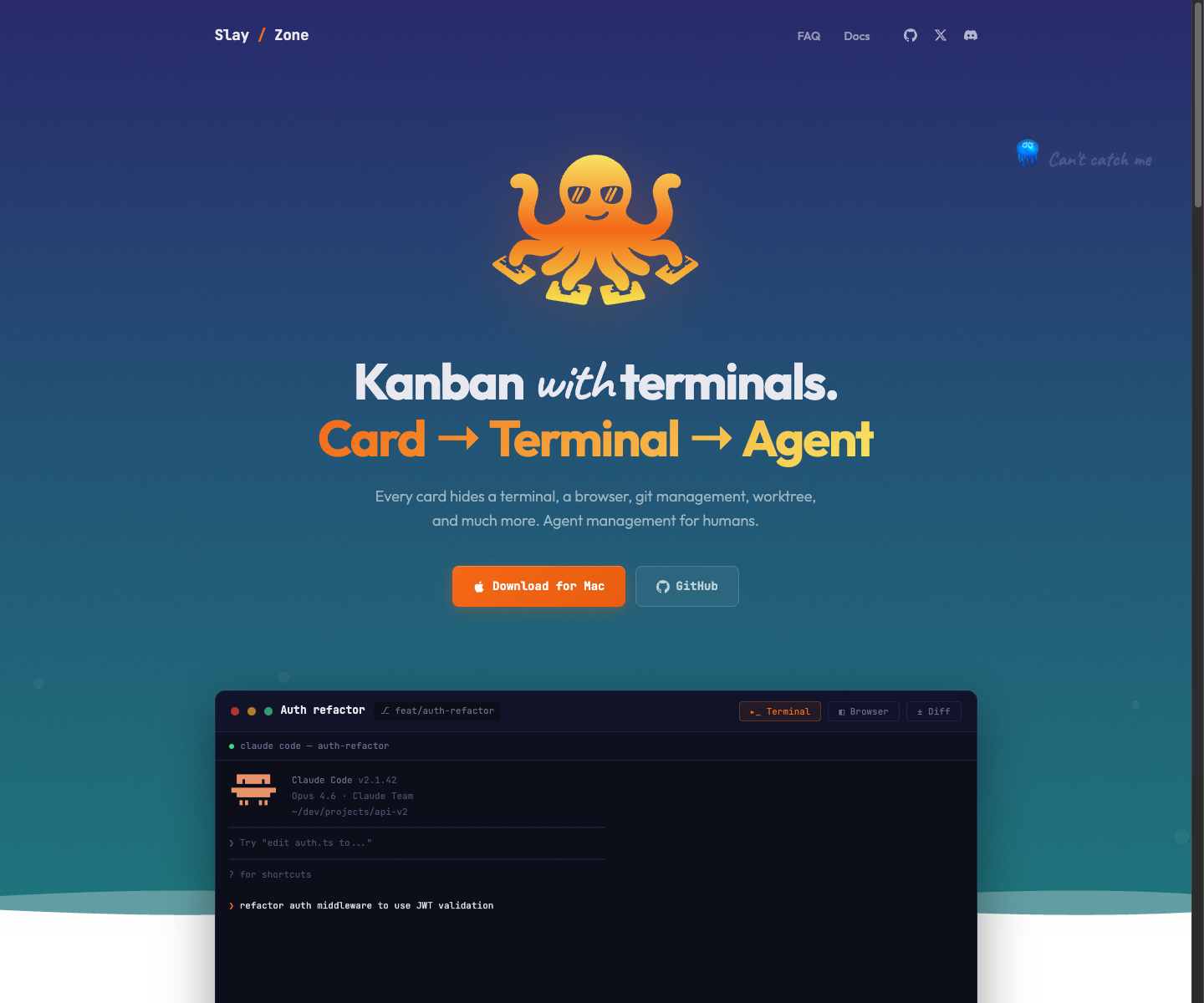
SlayZone homepage — kanban with terminals, card to terminal to agent workflow.
SlayZone — kanban board with per-task terminals, browser, and worktree isolation.
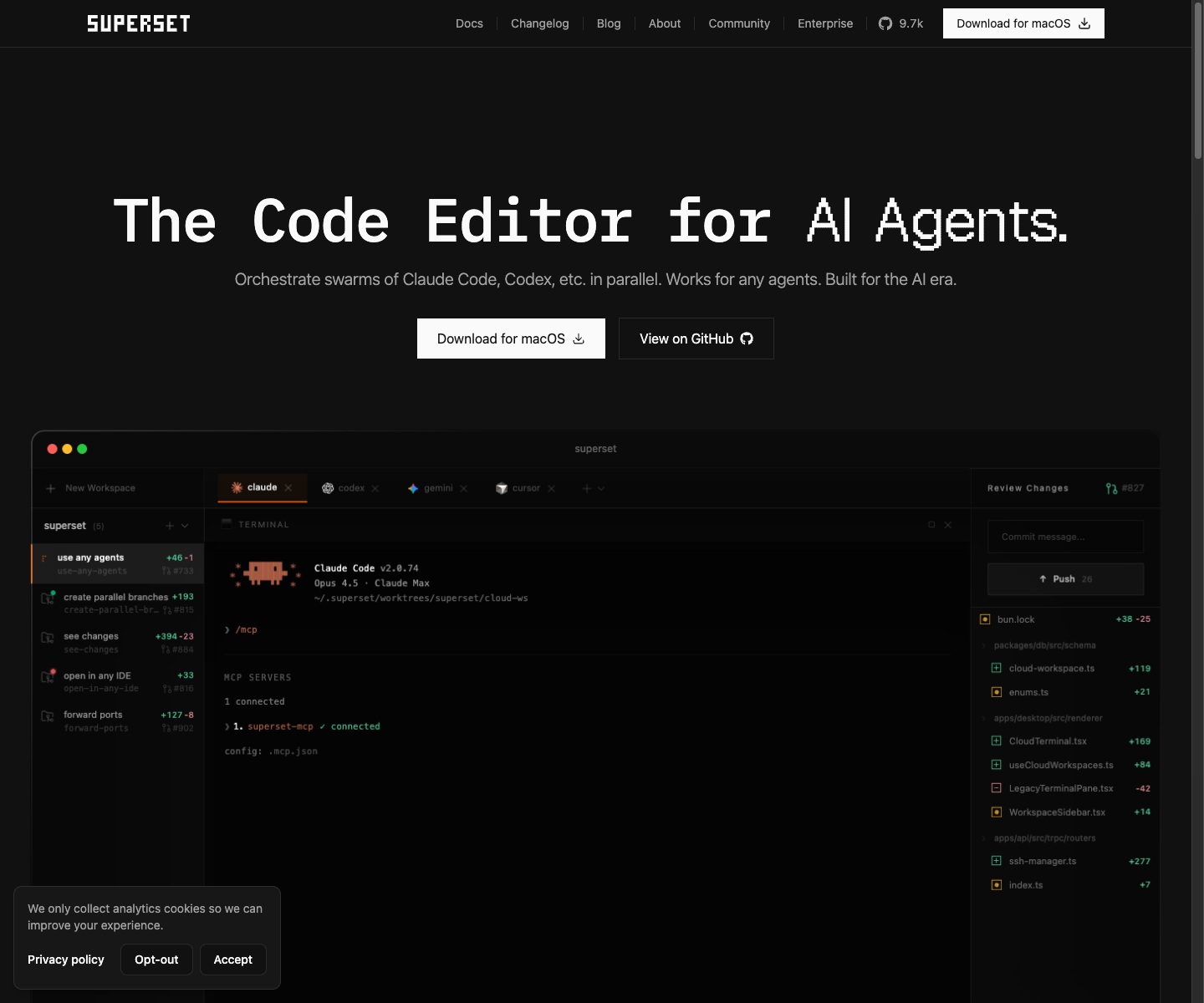
Homepage hero showing workspace sidebar, terminal with Claude Code, and changes panel.
Superset — Homepage hero showing workspace sidebar, terminal with Claude Code, and changes panel.

Pick SlayZone if

  • Your work lives on a kanban board — tasks, statuses, subtasks, drag-and-drop.
  • You need the app to run fully offline with no account or cloud sync.
  • You sync issues with Linear, GitHub Issues, or Jira and want them tied to task cards.
  • You want Windows and Linux support, not just macOS.

Pick Superset if

  • You want terminal sessions to survive app crashes via a persistent daemon process.
  • Your team is already on Clerk auth and cloud-synced tasks via ElectricSQL.
  • You rely on the 26-tool MCP surface for browser automation and task tooling.
  • You want per-workspace port allocation and configurable setup/teardown scripts.

About SlayZone

Task-first agent orchestration

Desktop kanban for AI coding agents. Every card hides a terminal, browser, git worktree, and code editor. Task-first orchestration — the board is the control surface, and each task owns its own isolated workspace.

Strengths

  • Kanban board is primary UX — task visibility, status flow, drag-and-drop, subtasks, dependencies.
  • Fully local-first: no login, no cloud sync, no mandatory account. SQLite on your machine.
  • Per-task isolation: each card owns its own terminal sessions, browser pane, worktree, and editor.
  • CLI companion (`slay`) mirrors task and browser workflows from any shell.
  • Issue sync with Linear, GitHub Issues, and Jira for teams that plan externally.

Weaknesses

  • No daemon-based terminal persistence — Superset's crash-recovery session model is stronger here.
  • Fewer MCP tools (growing) vs Superset's 26-tool surface.
  • No enterprise positioning or team/org features yet.
  • Younger community — smaller star count and less third-party coverage.

About Superset

Workspace-first agent execution

Desktop terminal multiplexer for orchestrating parallel CLI coding agents across isolated git worktrees. Workspace-first — the organizational primitive is the worktree, not the task card. Ships with real PTY, CodeMirror diff viewer, embedded browser, and cloud-synced task table.

Strengths

  • Daemon-based terminal session persistence across crashes — genuinely better than most competitors.
  • Near-daily release cadence (~100+ releases in 5 months) shows strong execution velocity.
  • Two MCP servers (26 tools) provide rich external integration surface.
  • Automatic worktree creation with configurable setup/teardown scripts and port allocation.
  • Enterprise logos (Microsoft, OpenAI, Netflix, Google) suggest real adoption traction.

Weaknesses

  • Mandatory login for local worktree access — "local-first" marketing is misleading given cloud auth dependency.
  • No kanban board or visual project management — workspace sidebar is not a PM tool.
  • ELv2 license (source-available, not OSS) — was previously misrepresented as Apache 2.0.
  • macOS-primary. Linux via AppImage (Feb 2026), Windows not yet shipped.
  • Mastra chat routes through Fly.io — privacy gap for users expecting local-only operation.

At a glance

Same stack instincts. Different center of gravity.

Closest architectural match to SlayZone — Electron + xterm.js + CodeMirror + SQLite + browser pane + worktrees. Supports 5+ CLI agents. No kanban board (workspace-oriented multiplexer, not PM). Direct positioning overlap on multi-agent orchestration surface.

Kanban board

SlayZoneYes
SupersetNo

This is product-shape, not garnish. Task-first orchestration is SlayZone moat.

Local-first

SlayZoneYes
SupersetPartial

No-login local workflows reduce friction and trust cost for serious dev work.

Real terminal

SlayZoneYes
SupersetYes

Fake consoles lose credibility fast. Real PTY is table stakes for agent orchestration.

Embedded browser

SlayZoneYes
SupersetYes

Docs, localhost, and verification need to stay attached to active work.

Git worktree isolation

SlayZoneYes
SupersetYes

Parallel work only scales if isolation is structural, not discipline-based.

MCP server

SlayZoneYes
SupersetYes

MCP is how external agents and tools act on task context instead of staying blind.

Full matrix

Where SlayZone leads, where Superset leads, where both are already table stakes.

CapabilitySlayZoneSupersetWhy it matters
Kanban board
Yes

Board is primary control surface. Tasks, statuses, subtasks, dependencies, tags, and search live in one place.

No

No visual kanban. Has cloud-synced task table with statuses, priorities, and Linear integration. Workspace sidebar groups by status (In Progress / Ready for Review) but no drag-and-drop board. Task creation from desktop added March 2026.

This is product-shape, not garnish. Task-first orchestration is SlayZone moat.
Local-first
Yes

Public site positions SlayZone as local-first. Task execution, agent sessions, and browser control stay on your machine.

Partial

Hybrid two-tier architecture. Local SQLite for projects/workspaces/settings. Cloud Neon PostgreSQL + ElectricSQL for tasks/orgs/presence. Requires login even for local worktree access. Open feature request for offline mode (#1722).

No-login local workflows reduce friction and trust cost for serious dev work.
Real terminal
Yes

Each task owns real PTY sessions with your shell, tooling, and agent CLIs.

Yes

Real PTY via xterm.js 6.0 + node-pty. Dedicated daemon process for session persistence across crashes. Per-workspace terminals with split panes and configurable presets.

Fake consoles lose credibility fast. Real PTY is table stakes for agent orchestration.
Embedded browser
Yes

Every task can keep its own browser pane open beside terminal and diff surfaces.

Yes

Electron Chromium webview, workspace-scoped. 20 reserved ports per workspace for port forwarding. DevTools support added Feb 2026. No mobile emulation.

Docs, localhost, and verification need to stay attached to active work.
Code editor
Yes

Public comparison and feature pages position SlayZone with integrated editor and diff review surfaces.

Partial

Switched from Monaco to CodeMirror (March 9, 2026) — 97% smaller, faster. Side-by-side and inline diffs, hunk-level staging. Positioned as review/staging tool, not IDE replacement. IDE deep-linking (VS Code, Cursor, JetBrains, Xcode, Sublime).

Review speed matters when many agents are generating diffs in parallel.
Git worktree isolation
Yes

Each task can own its own worktree, branch, and workspace context.

Yes

Automatic worktree creation on workspace create (~2s). Configurable base dirs. Setup/teardown scripts. Port allocation per worktree. No hard capacity limit.

Parallel work only scales if isolation is structural, not discipline-based.
MCP server
Yes

SlayZone exposes an MCP server and `slay` CLI so agents can read and update task state.

Yes

Two MCP servers — @superset/mcp (17 tools, streamable HTTP) for tasks/workspaces/devices, @superset/desktop-mcp (9 tools, stdio) for browser automation. 26 combined tools.

MCP is how external agents and tools act on task context instead of staying blind.
Multi-provider agents
Yes

Public site explicitly positions SlayZone around Claude Code, Codex, Gemini, OpenCode, Cursor, and local-first CLIs.

Yes

5+ CLI agents via terminal presets — Claude Code, Codex, Gemini CLI, Cursor Agent, OpenCode. Built-in Mastra chat supports Anthropic and OpenAI models. All BYOK.

Real teams mix Claude Code, Codex, Gemini, and local agents by task.
Issue sync
Yes

Feature copy promises two-way sync with Linear, GitHub Issues, and Jira.

Partial

Linear integration syncs issues as tasks, mirrors comments and attachments. Task schema has external_provider/external_id fields. No other issue tracker integrations confirmed.

Most teams still plan in external PM tools. Sync matters more than replacement.
PR workflow
Yes

Feature copy positions PR creation, review, comments, merge, and cleanup inside task flow.

Yes

Review tab in Changes sidebar (March 23, 2026) for reading/responding to PR comments in-app. Hunk-level staging, commit, push. PR check status inline. Create PRs via gh CLI.

Shipping loop should stay close to task, diff, and terminal context.
Native desktop
Yes

Docs page positions SlayZone as desktop app for macOS, Windows, and Linux.

Yes

Electron 39. macOS primary with DMG installer. Linux AppImage added Feb 2026. Windows planned but not shipped. Download button only shows macOS.

Persistent orchestration hub works better as installed desktop software than browser tab.
CLI companion
Yes

The `slay` CLI mirrors key task and browser workflows from any shell.

No

No separate CLI tool. Desktop-only product.

CLI hooks let the product fit existing shell-heavy workflows instead of replacing them.

SlayZone pricing

Free and open source. No account required.

Superset pricing

Free core product. Pro at $20/seat/month for teams. Enterprise via contact. AI costs are BYOK — no markup.

Decide for yourself

Try both. Pick the one that fits your workflow.